
This time, I would like to discuss commonly encountered computer and mobile image formats(types). Images have different file types (extensions), such as Jpg, gif, and png, and I will give a general explanation of the characteristics of these formats.
Classification of Image Formats (Extensions)
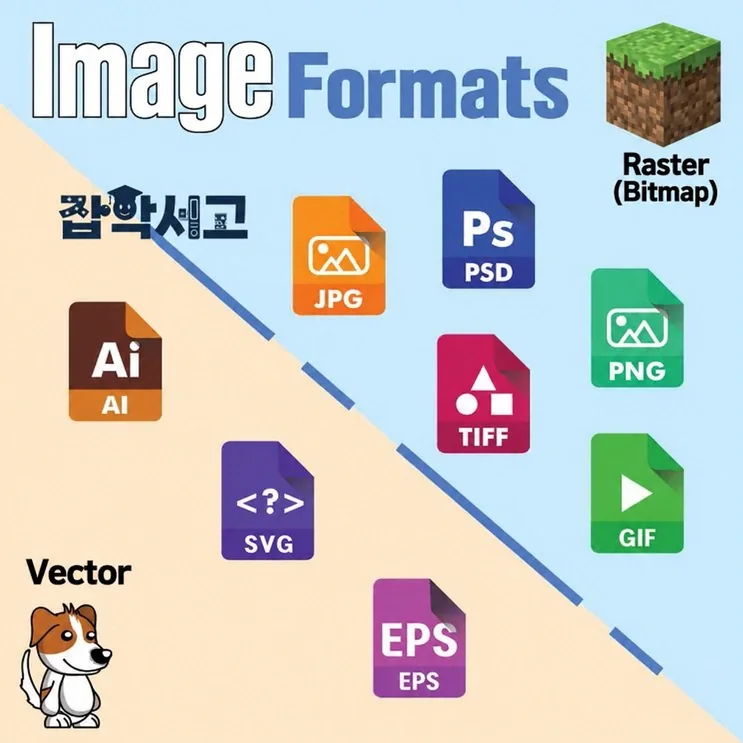 Classification of Image Format Extensions
Image formats can broadly be divided into bitmap formats and vector formats. A bitmap is a file in which tiny square pixels come together to form an image, and the image becomes increasingly pixelated as you forcibly enlarge the display.
By contrast, vector graphics are images generated through mathematical calculations, representing images through connections between points and lines. The greatest advantage of vector graphics is that they do not become pixelated, no matter how much their size is increased.
In this article, I will classify and explain commonly used bitmap and vector image formats.
Bitmap Formats
 What Is a BMP Image?
BMP is short for Bit MaP and is a format developed by Microsoft to represent bitmap data in the Windows environment. It is the simplest file format, using no compression, which results in large file sizes.
 JPEG Image
JPEG is an international standard specification for compressing grayscale or color still images. It is commonly used in professional fields such as art and publishing, and its efficient compression also makes it widely used on the web.
I think this may be the format most familiar to ordinary users. Its full name is Joint Photographic Experts Group, and it can represent 1600 times ten thousand colors.
Another major characteristic of JPEG is that users can adjust image size: with ordinary image files, image quality drops proportionally as file size is reduced, but JPEG lets users set their desired image quality and size while minimizing degradation.
 GIF Animation (Created by GK Library)
GIF is short for Graphics Interchange Farmat and is a format developed to minimize transmission time when sending images over the internet or a network. It can represent 8-bit color with 256 colors and supports alpha channels (transparent backgrounds) and animation, making it one of the formats used very extensively on the internet for purposes such as animated GIFs.
Its animation feature also makes it possible to present multiple image files as a single image. However, although its image compression ratio is high, its supported colors are limited to 256, making it unsuitable for situations that require images of above-average quality.
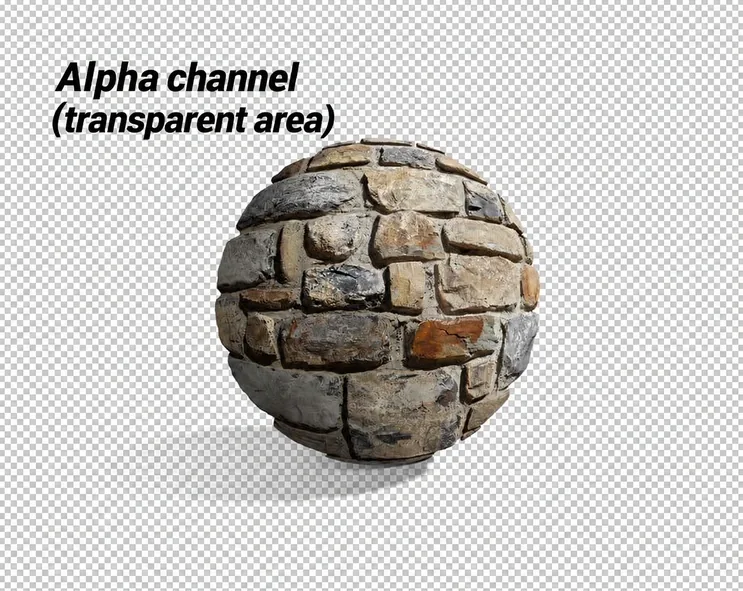 Illustration of PNG alpha transparency (checkerboard shown for illustration)
PNG is short for Portable Network Graphics and is one of the lossless compressed file formats. Like GIF, it is a leading image format that supports alpha channels (transparent backgrounds), and it also has an anti-aliasing feature that smooths images with sharp edges.
PNG is also widely used on the web because it causes no image loss and can display images on the web faster than GIF or JPEG. At present, it can be considered the most efficient format because it offers a high compression ratio and can represent high-resolution images.
 Example of Saving a TIFF File
TIFF is short for Tagged Image File Format and is commonly known as the first file format to offer good compatibility. It supports RGB images used on the web and CMYK images used for printing at up to 24 bits, and it uses lossless compression called LZW (Lempelziv welch).
Its image quality is not particularly good, and when saving an image in Photoshop, various options are available, including the compression method and a choice between IMB PC & MAC PC.
 Adobe Photoshop
PSD is a file format used exclusively by Adobe's Photoshop. Its defining feature is that it can save not only image information but also hierarchical layers, paths, vectors, channels, and more. It offers excellent compatibility with programs developed by the same company, allowing it to work in conjunction with Illustrator, also developed by Adobe, as well as video editing and compositing programs such as Premiere and After Effects.
While AI (Illustrator) uses vector format by default, PSD (Photoshop) uses the bitmap method by default.
TGA is a format created for use with the Targa board developed by Truevision. It supports color at up to 32 bits and uses RLE compression, a lossless compression method.
Because TGA is subject to relatively few patent restrictions, it is sometimes used for saving screenshots in games. It is inefficient at compressing high-quality images, but provides a reasonable compression ratio for simple images.
Vector Formats
 Adobe Illustrator
AI is the Illustrator file format developed by Adobe, and stands for Adobe illustrator. It is the most prominent format that uses the vector method and is widely used in design and publishing because images can be enlarged to any size without degradation.
It is unsuitable for photographs and other images that use the bitmap method, but is useful for work that creates something new, such as logo creation, pictograms, and character design.
SVG is short for Scalable Vector Graphics and is an XML-based vector file format. Because SVG files are written in XML, they can be opened on the web or as text, and since they support the vector method, you can also work on them in Illustrator while freely adjusting their size.
In other words, it can be described as a combined metadata + graphics image format that lets you enter metadata using XML to make searches easier, while also allowing graphics work.
Although other formats use the vector method, such as EPS (electronic publishing), CDR (CorelDRAW), and WMF (Windows metaformat), AI (Illustrator) accounts for such an overwhelming share of usage in the vector field that I will avoid discussing them unnecessarily.
That concludes our look at various image formats (types/extensions). You will have seen that while some extensions, such as PNG, JPG, and GIF, are commonly known even to people who are not professionals, other image formats, such as PSD, AI, and SVG, are more likely to be familiar to professional graphics workers.
The extensions introduced in this article account for most of those used for ordinary still images. Each extension has its own uses, with JPG and PNG mainly used on the web to maintain a high compression ratio and a good level of quality, and GIF used for images intended for fun, such as animated GIFs, so the formats used will rarely differ greatly from those introduced above. Familiarizing yourself with these image formats will be helpful for graphics work, internet browsing, and other activities.