
This time, I would like to prepare material on how library systems develop and become automated, along with the advantages and disadvantages of introducing automation.
Library automation refers to the use of electronic equipment and computer technology to automate core library operations, such as acquisitions, cataloging, loans and returns, and interlibrary loans, so that they can be performed more effectively.
Automation can reduce simple, repetitive tasks within a library, thereby lowering the cost per unit of work, and can provide users with improved services and functions.
This material will cover the development of these library automation systems, focusing on the period from the 1990s onward, when the Internet and automation began to be adopted in earnest. Earlier developments will be introduced through an image and a general overview.
The Development of Library Automation (Before the 1990s)
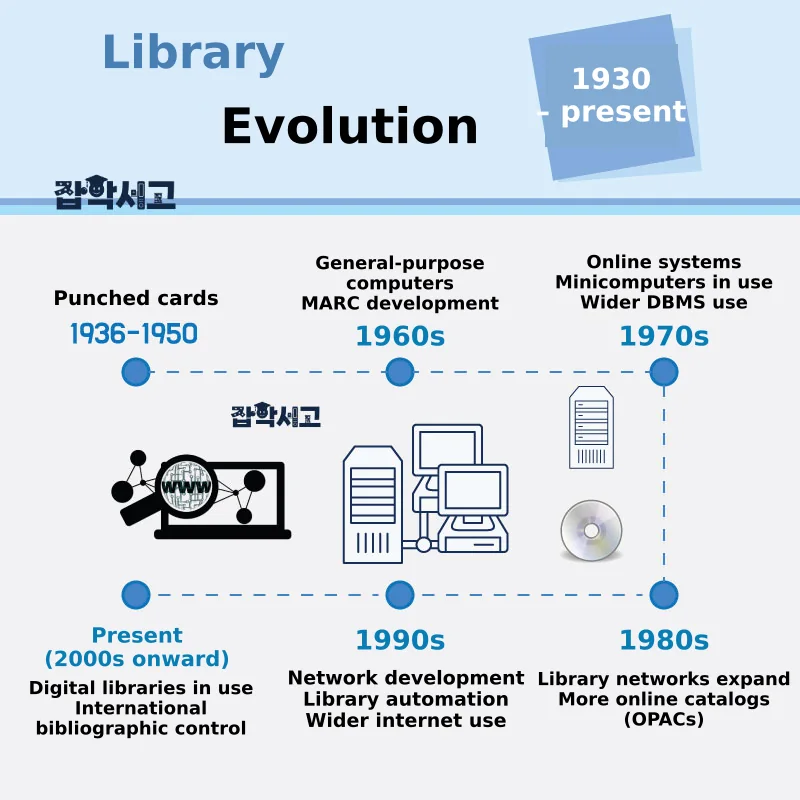 The Development of Library Systems (From the 1930s to the Present)
First, I created the image by selecting only the main keywords from the entire history of library systems, from their early stages to the present.
Before the 1980s
- 1936-1950 - Punched Card Systems
- The 1960s - Use of General-Purpose Computers / Development of Machine-Readable Cataloging (MARC:Machune Readable Cataloging)
- The 1970s - Use of General-Purpose Computers / Development of Online Systems / Beginning of Minicomputer Use / Widespread Use of DBMS
- The 1980s - Full-Scale Development of Library Networks / Growth of Online Public Access Catalogs (OPAC)
As the 1980s began, computers gradually became smaller, and microcomputers continued to be developed, leading library network systems to begin being used independently.
In addition, online public access catalogs (OPAC) began to increase from the 80s onward, and libraries used CD-ROM for library operations, bibliographic information searches, reference information searches, and other purposes.
Systems in the 1990s
 The Introduction and Development of Networks
As the 90s began, various networks, including local area networks (LAN), wide area networks (WAN), and the Internet, developed and began to influence library automation.
Efforts continued to apply standards for network-related technologies, such as communication protocols and electronic document exchange formats, to share library information through networks. As users became able to access information from other libraries directly through networks, demand for immediate full-text delivery services tended to increase.
Later, GUI environments began to be introduced as user interfaces, and the databases of library automation systems began to be transformed into integrated databases containing bibliographic and multimedia information.
From the 1990s Onward
 The Rapid Development of the Internet
As the late 90s began, use of the Internet and information available on it started to become widespread, library operations became automated, and services began to be provided through bibliographic databases.
In addition, libraries and library users around the world became able to easily access information retrieval and full-text delivery services provided by bibliographic utilities through the Internet.
The Present
 The Diversification and Integration of Information
Today, electronic library systems are used in all libraries. Electronic library systems provide a variety of content, ranging from bibliographic information about library holdings to full texts and multimedia materials.
Activities such as the international exchange of technical reports from different countries are taking place, along with international bibliographic control efforts involving cooperation around the world.
In addition, standard technologies such as digital rights management (DRM), digital object identifiers (DOI), XML, and metadata have become essential elements in the distribution of digital library resources.
The Advantages and Disadvantages of Library Automation
 What Are the Characteristics, Advantages, and Disadvantages of Library Automation?
As library systems become automated, they offer increasing convenience, but advantages inevitably come with disadvantages. The advantages and disadvantages of library automation are outlined below.
Advantages of Library Automation
- Library operations can be handled quickly, accurately, and conveniently.
- Library services are expanded and developed in various ways and provided to users.
- Library resources are easier to manage and use.
- Resources outside the library can be used easily, improving the library’s functions.
Disadvantages of Library Automation
- As the size of a library increases, the burden of initial and maintenance costs grows.
- Incorrectly entered data can cause potential errors.
- If the system malfunctions or a power outage occurs, all library operations are brought to a halt.
- It takes a long time for the system to become stable.
This concludes our look at the development of library systems and the advantages and disadvantages of automation.
Please keep in mind that the development of library systems follows advances in computer and Internet technology and is closely connected with them. I hope this material has helped you understand library systems.