Have you ever been watching a vlog and noticed that, even though the speaker is sitting in one place, their outfit, hand position, or the props in the background suddenly change, making you think, “A whole chunk of time just got cut out”? In films, too, there are scenes where a character seems to ‘jump’ forward in fits and starts within the same composition, quickening the rhythm. An edit like this, which cuts out the time in between while keeping the same subject and nearly the same camera angle and framing, thereby exposing the discontinuity, is the jump cut.
Put simply, a jump cut is ‘a cut that removes the middle of a continuous shot so that action and time appear to jump forward.’ It is a technique that shows the audience the very gaps in time that classical Hollywood continuity editing tried to hide. Traces of it can be found in early cinema and in works such as Vertov's Man with a Movie Camera, but it was Jean-Luc Godard's Breathless (1960), together with the French New Wave, that made the technique famous around the world.
This article explains, in easy-to-understand terms, what a jump cut is and how it relates to the 30-degree rule, Godard and the history of editing, how it differs from the match cut, and how it is used on YouTube and in documentaries, along with common misconceptions.
How the Jump Cut Works and How It Is Used
What Is a Jump Cut?
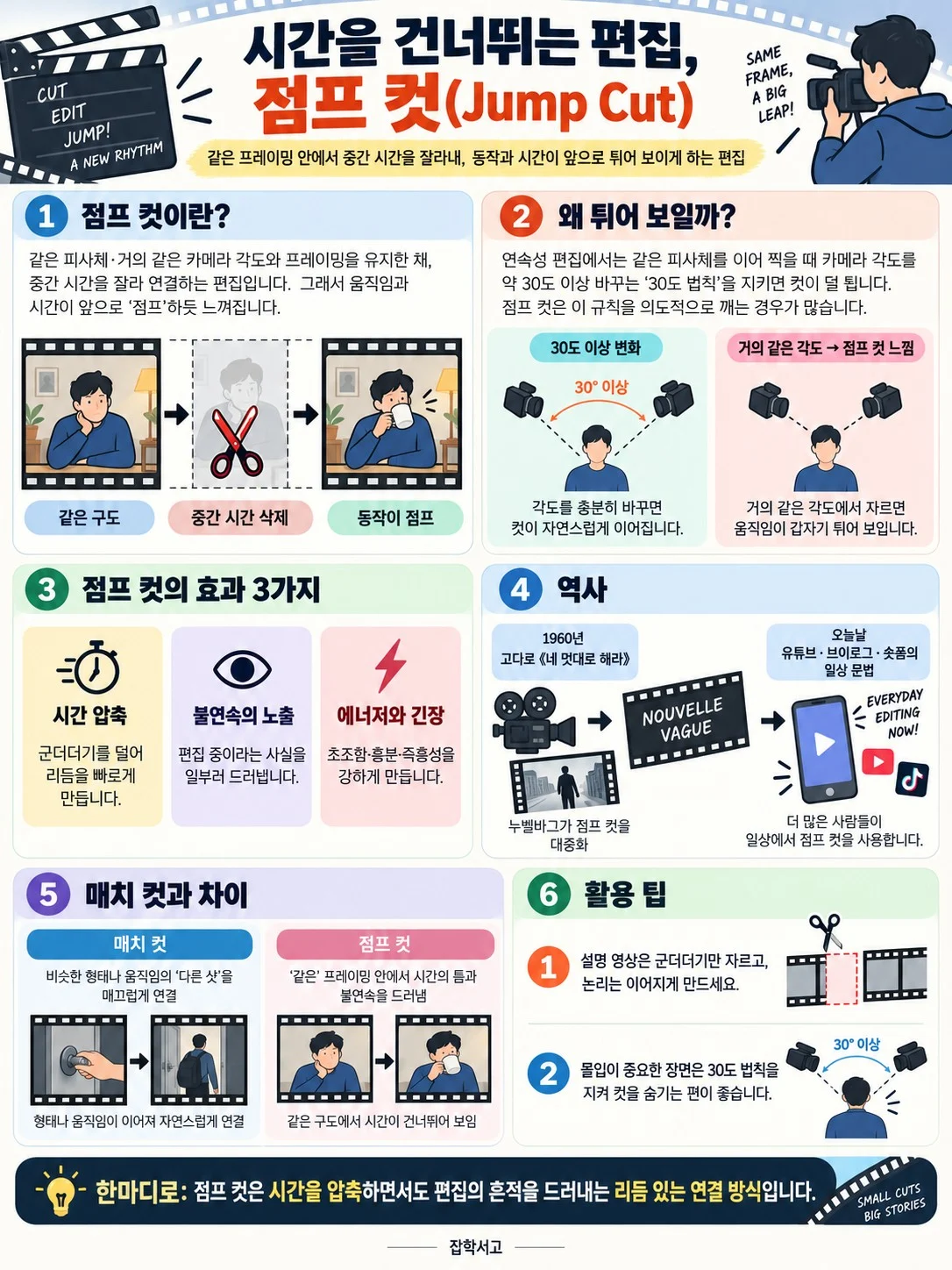

A jump cut is an edit in which time leaps forward ‘in the same place, with a similar frame.’ The camera barely moves and the subject is the same person continuing the same action, but when the frames in between are cut out, the person's head position or gestures appear to change abruptly. At that moment, viewers sense that “something is missing.”
The 30-degree rule, a key rule of continuity editing, is a guideline stating that when you film the same subject in consecutive shots, you should change the camera angle by about 30 degrees or more. If the angle changes enough, the cut flows naturally as if to a ‘different shot’; if the difference in angle is too small, the image seems to shift slightly and feels like a jump. Jump cuts often deliberately break this very rule.
- Temporal compression: Cutting out waiting, hesitation, and repeated actions speeds up the rhythm.
- Visible discontinuity: Instead of a seamless illusion, it reveals the fact that “this has been edited.”
- Energetic tension: A series of short jumps emphasizes the pace of speech and heightened emotion.
The key point is that it is not a clumsy splicing mistake but a choice that changes the sense of time and the style.
Why Break the 30-Degree Rule, and When Is It Used?

Continuity editing is a tradition designed to make viewers forget the cuts and become absorbed in the story. The jump cut briefly shakes that absorption to achieve a different effect.
(1) Rhythm and compression
Cutting out “um…,” long silences, and repeated phrases from an interview or monologue leaves only the content and quickens the pace. This is a common use in vlogs and tutorials.
(2) Style and self-consciousness
The French New Wave of Godard's era rebelled against Hollywood's seamless editing and delighted in devices that revealed films to be assembled artifacts. The jump cut became a symbol of that ‘self-conscious cinema.’
(3) Emotional unsteadiness
When a character lurches forward within the same framing, inner rhythms such as anxiety, excitement, and unease are conveyed visually. In documentaries, too, it is used as a way to trim excess footage while preserving a sense of being on the scene.
However, if shots are spliced together with only a slight change in angle or composition, the result is not an intended jump but ‘a jump that looks like a mistake.’ To use the technique, you need to make a clear choice: either deliberately keep the same framing or, conversely, cut to a sufficiently different shot.
From Godard to YouTube: History and Examples

The moment the jump cut became ingrained in the language of popular film was Breathless in 1960. In this film, directed by Jean-Luc Godard with Cécile Decugis among its editors, scenes such as Jean Seberg riding in a convertible through the streets of Paris are famous for their time jumps within the same composition. The French New Wave's free experiments in shooting and editing had a major influence on world cinema.
Even earlier, early cinema, Soviet montage, and Vertov's Man with a Movie Camera included experiments in cutting and joining time and space. Still, Breathless is most often cited as the milestone in film history where the jump cut was consciously used as ‘a stylistic device that breaks the rules of continuity.’
Today, the jump cut has become an everyday convention on YouTube, in short-form video, and in vlogs. It is both a practical tool for omitting slips of the tongue and waiting time to improve audience retention and a stylistic device for creating a fast-talking delivery and a distinctive personality. In effect, the ‘artistic discontinuity’ of theatrical film and the ‘efficient compression’ of online video share the same technique for different reasons.
How It Differs from the Match Cut, Misconceptions, and Tips

The jump cut is often confused with the match cut. Both are ‘cuts,’ but their purposes are nearly opposite.
(1) The match cut smooths, the jump cut reveals
A match cut joins different shots that are similar in shape, movement, or composition, linking time, space, and meaning naturally (or poetically). A jump cut removes the middle within the same framing to reveal the discontinuity.
(2) Cutting anywhere does not make a jump cut
A cut that changes the angle, distance, and composition enough is closer to an ordinary transition between continuous shots than to a jump. The feel of a jump cut comes from the perception that ‘the image is almost the same, yet time has jumped.’
(3) How to use it in practice
In monologues and explainer videos, cut the clutter and keep only the flow of speech, but make sure the logic of what is being said stays intact. In narrative films and music videos, you can deliberately keep the same composition and make short jumps for emotional rhythm. Conversely, in scenes that call for immersion, it is better to follow the 30-degree rule and hide the cuts.
Editing is the art not only of “what to show” but also of “what to cut out.” The choice between making time skip within the same image and joining smoothly to a different image creates the rhythm of a video.
The jump cut is an edit that breaks the rules of continuity to reveal time, rhythm, and self-consciousness. From Godard's experiments to today's vlogs, ‘the courage to cut out the middle’ has changed the pace of moving images.
A sense for choosing what to keep and what to skip within the same composition: that is the first step in video editing.