
Programming (coding) is a language used to give instructions to a computer, and it requires following specific syntax.
To this end, this material will cover various syntax elements such as variables, conditional statements, loops, functions, and arrays, and understanding and mastering this syntax will help deepen your understanding of programming.
We will now introduce the basic syntax of programming and explain the function and usage of each syntax element.
What Is Programming (Coding) Syntax?
 What Is Programming (Coding)?
Programming (coding) syntax is a set of rules and conventions used to write programs. Syntax plays an important role in determining a program's structure and behavior.
This syntax consists of conventions for accurately conveying the user's intent when giving a computer instructions.
Following syntax precisely allows the computer to understand and execute the programmer's intent correctly. Incorrect use of syntax can cause compilation errors or runtime errors. Using correct syntax can minimize these errors.
 Syntax Varies by Language
Syntax consists of various keywords, operators, identifiers, data types, control structures, and so on. Programs must be written by arranging these components in the correct order and format.
Because each language has different syntax, applying one language's syntax directly to another can cause errors.
For example, Python uses indentation to mark blocks, while Java and C++ use curly braces { }.
Learning syntax is a fundamental step toward writing programs in a particular programming language. This is similar to learning grammar when learning a language.
Just as you need to know grammar rules to construct correct sentences, you need to know the syntax of a programming language to write correct code.
Variables
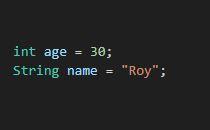
A variable refers to a memory location where a value is stored. Variables are used to store and process data in programs.
A variable refers to space allocated in memory, where data values are stored. A variable has a name (identifier), and this name can be used to access the variable or change its value.
A variable has a data type (e.g., integer, real number, string, and so on), and once declared, it can store only data of that type (with exceptions in some dynamically typed languages). A variable's value can also be assigned or read.
 Variable Usage Example
Using variables lets you handle data flexibly within a program. For example, you can store age information entered by a user in a variable and use that variable to calculate what the user's age will be in 1 years.
However, there are also points to keep in mind. Variables may have unexpected values if they are not initialized, and variable names should clearly indicate their purpose or the meaning of the data they store.
if Conditional Statements
 if Statement Structure
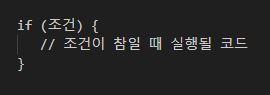
An if conditional statement is a control statement that executes a specific block of code only when a given condition is true. Conditional statements are used to branch the flow of a program.
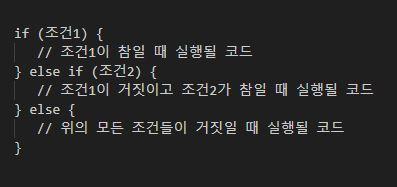 if else Structure
If the condition is not true, an else block can be used to execute other code. This allows you to branch the program's flow or perform specific tasks based on conditions.
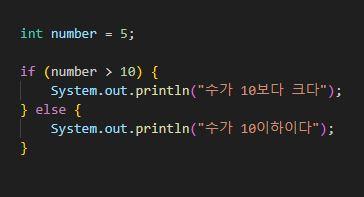 if else Example
if conditional statements are used in various situations. Examples include checking the validity of user input, processing based on specific conditions, and processing only data that meets certain conditions during data analysis.
However, the conditions used in conditional statements must be clear, and excessive use of nested if statements can reduce code readability, so it is best to keep them as concise as possible.
for Loops
A for loop is a control statement that repeatedly executes a specific block of code a given number of times.
Loops are used to access all elements in an array or list or to perform a particular task repeatedly. The number of times a loop executes is determined by its initial value, conditional expression, and increment/decrement expression.
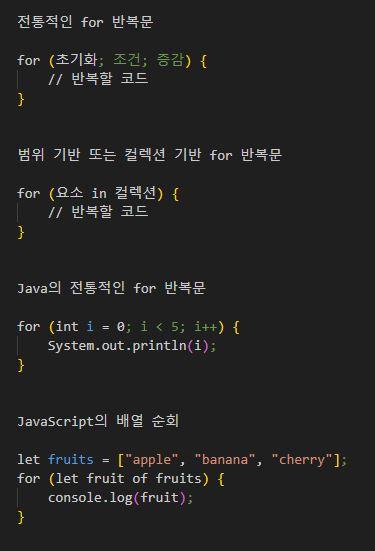 for Loop Structure and a Java Example
for loops are mainly used to repeat a specific task a specified number of times, iterate over sequential data structures such as arrays, lists, and strings, and repeat execution while a specific condition is satisfied.
However, to avoid infinite loops, the loop condition must be set so that the termination condition can be satisfied. You must also pay attention to the variables and conditions used inside the loop to prevent unexpected results or side effects.
while Loops
A while loop is a control statement that repeatedly executes a specific block of code only when a particular condition is true. The number of times the loop executes is determined by the conditional expression.
The loop continues to execute while the conditional expression is true and terminates when the expression becomes false.
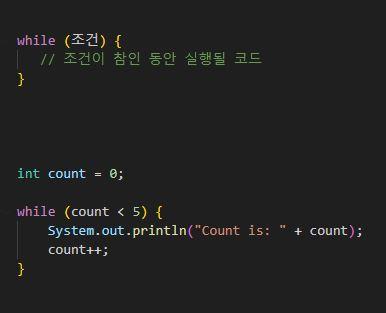 while Loop Structure and Examples
Unlike for loops, while loops are mainly used when the exact number of iterations is not known in advance or when you want to continue repeating until a specific condition is satisfied.
For example, they are used when you want to repeat an operation until a particular condition is met, such as receiving user input or waiting for a response to a network connection request.
However, if a while loop's condition is always true, it can become an infinite loop. Therefore, you must write it carefully so that the condition can eventually become false.
The logic that changes the condition must also be included inside the loop. Otherwise, the condition will not change, creating a risk of an infinite loop.
Functions and Methods
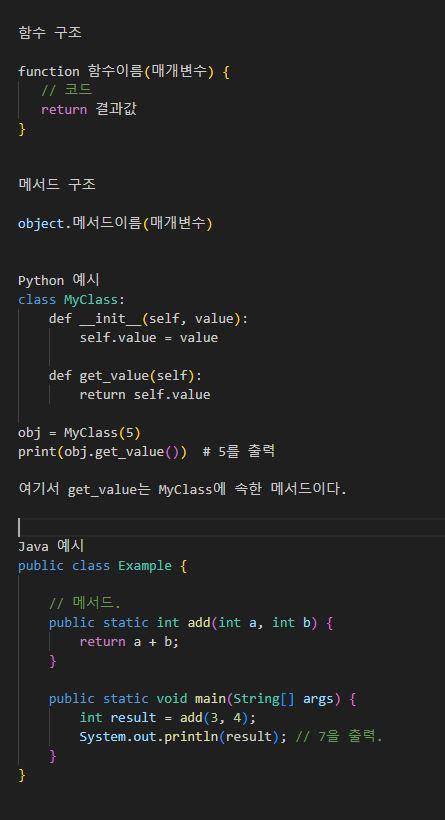 Function and Method Structures and Examples
Functions
function 함수이름(매개변수) {
// 코드
return 결과값
}
A function is a collection of code that performs a particular task. Functions are mainly used to reuse code that is needed repeatedly; they receive input, process it, and return a result as needed.
Functions are used to improve code reusability, modularity, and organization. They are also used to divide complex tasks into smaller units.
Methods
object.메서드이름(매개변수)
In object-oriented programming, a method is a function that belongs to an object. Methods perform operations on the object's properties (data) or change the object's state.
Functions and methods can promote program modularization and improve code readability and reusability.
In Java, all functions (methods) must be defined inside a class. Therefore, Java has no separate, independent concept of a "function"; they are all handled as methods.
Methods are used to inspect or change an object's state and represent its functionality. They are also used to define an object's behavior in object-oriented programming.
Differences Between Functions and Methods
Functions and methods may seem similar, but they differ. A function is generally an independent block of code that does not belong to an object or class, whereas a method belongs to a particular object or class.
Another difference is that functions are called by name alone, while methods are called through the corresponding object or class instance.
Arrays
배열 이름[인덱스] = 값
An array is a data structure used to store multiple values in a single variable. Each element in an array can be accessed through an index, and arrays are supported in most programming languages.
Arrays allow you to manage and process data efficiently. Before using arrays, you should know the following characteristics.
- The size specified when most traditional arrays are created cannot be changed.
- All elements in an array must have the same data type.
- Array elements can be accessed quickly using indexes.
- Arrays store elements in contiguous memory locations, so they use memory efficiently. However, problems can occur if you try to add elements beyond the array's size.
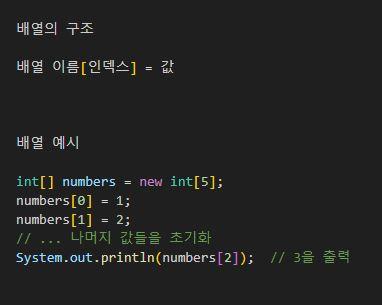 Array Structure and Examples
Arrays are used to store and manage data of the same type sequentially, access elements quickly, and efficiently store multiple pieces of data in contiguous memory.
This material has introduced the function and usage of the various syntax elements used in programming (coding).
Understanding and using basic syntax is central to programming. You can achieve the desired results by writing programs that use syntax elements such as variables, conditional statements, loops, functions, and arrays appropriately.
We hope that mastering the basic syntax of programming will help you write efficient, easily maintainable code.